A focus tracker that shows where your study time goes
Pomo Up is a Pomodoro timer that doubles as a study time tracker. Every Pomodoro and stopwatch session is logged under its tag automatically. Home is today’s focus report, Insights covers the week, Reports go back by day, week, month or year with heatmaps and streaks — and the focus leaderboard shows how your week stacks up.
Open Pomo Up and the Home tab is today’s report: total focus time and how it compares with yesterday, plus an hour-by-hour chart colored by tag, so you can see when you studied and when you worked. Below it are your finished Pomodoros, breaks and abandoned sessions — and, if you focus with AirPods, how many minutes you kept your head up.
Tap the date strip or the calendar to look back at any day.
Home is today’s report
02
Weekly insights, with Screen Time alongside
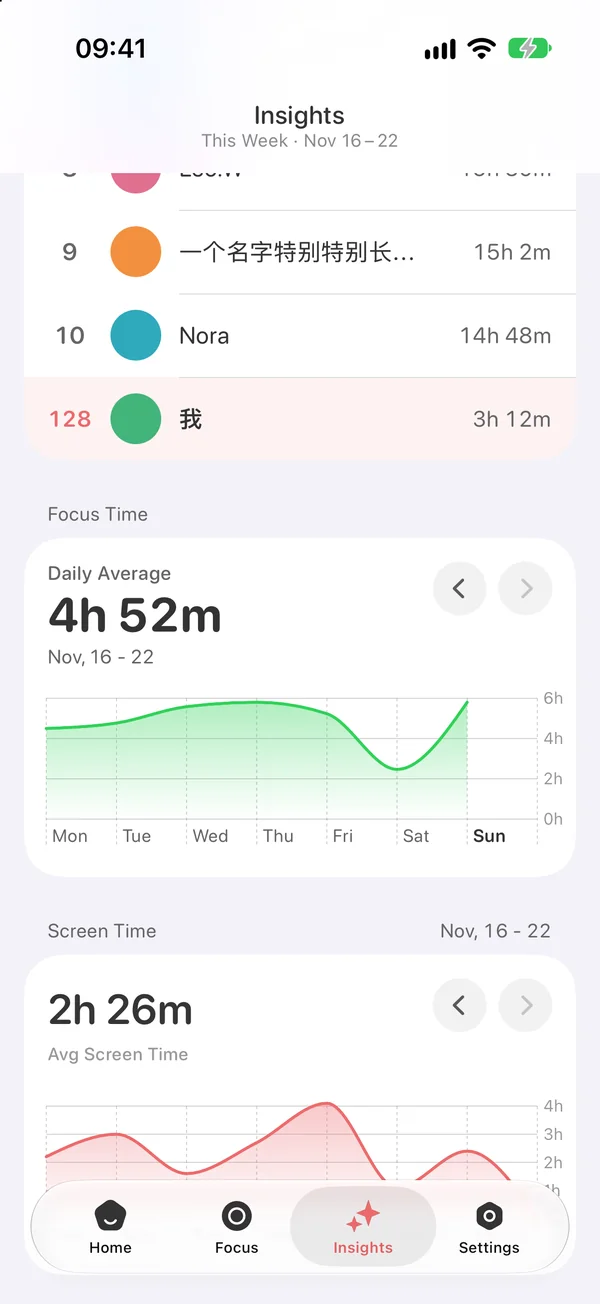
Insights sums up the week: your daily focus average and a line for each day, so the good days stand out. Swipe back to compare with earlier weeks.
Allow Screen Time access and the same page shows how long you used your phone each day this week, while the Screen Time view on Home breaks down today’s app usage and time in distracting apps. More focus, less scrolling — easiest to see side by side. To lock those apps during a session, see the app blocker.
This week’s focus time and Screen Time
03
Focus by tag: where the hours went
Every session carries a tag — Study, Work, Reading, Coding or anything you create. Focus by Tags turns the week into a ring chart with each tag’s share and hours listed underneath, which makes it an easy way to track study time per subject or hours per project.
Each tag also remembers its own length and timer mode, so picking the tag starts the session and keeps your records sorted.
The week, split by tag
04
Reports: heatmaps, streaks and history
Open Reports from Settings and switch between day, week, month and year: total focus, head-up time, Pomodoros, breaks, abandoned sessions and head-downs, each compared with the previous period. A 7-day average helps you find your rhythm.
The month and year views add a focus heatmap — darker days mean more focus — with the number of days you focused and your longest streak. Logged something by mistake? Records can be edited or deleted.
Focus heatmap and longest streak
05
Focus leaderboard: see how your week stacks up
At the top of Insights sits the weekly focus leaderboard, powered by Game Center. Switch between Friends and Global; the week’s champion takes the top spot and your own rank stays pinned at the bottom. Studying alone is easier when you can see others putting in the hours too.
All records stay on your devices and sync through your own iCloud across iPhone, iPad, iPhone Duo and Mac — no account to create. On Mac, ⌘1 opens the Statistics window; see the Pomodoro timer for Mac.
Weekly focus leaderboard (Friends / Global)
?
Questions, answered.
Something else on your mind? Email us at [email protected] — a real person reads every message.
Pomo UpCan Pomo Up track my study time?
Yes. Every Pomodoro and stopwatch session is logged under its tag automatically — Home shows today, Insights shows the week, and Reports go back by day, week, month or year.
Pomo UpCan I see time per subject or project?
Yes. Create a tag for each subject or project, and Focus by Tags shows each one’s share and hours.
Pomo UpIs there a focus heatmap or streak?
Yes. The month and year views in Reports include a focus heatmap, the number of days you focused and your longest streak.
Pomo UpHow do I join the focus leaderboard?
The leaderboard uses Game Center. Sign in to Game Center on your iPhone and Insights shows both the Friends and Global boards.
Pomo UpDoes it show Screen Time too?
Yes. After you allow Screen Time access, Insights shows daily Screen Time for the week and the Screen Time view on Home shows today’s app usage.
Pomo UpWill my records follow me to a new device or my Mac?
Yes. Records sync through your own iCloud across iPhone, iPad, iPhone Duo and Mac, with no account to create.
Your next tomato starts now.
Free download for iPhone, iPad, iPhone Duo and Mac.